Workshop Tues 15th April – Alistair Wilson

The workshop this month is a talk by Alistair Wilson (Vicki Moritz’s son) specialising in dramatic landscape and seascape photography.

So don’t miss this special night which because of recent numbers will be held in the Craft Room at the community centre and NOT at Wadham House. If you are unsure where the Craft Room is then just come to the Community Centre as if it were a competition night and walk right past the Main Hall and the Craft Room is on the right.

You won’t want to miss this great night so come along, support your club and enjoy this learning experience, 7.30pm for a 7.45pm start.

facebook-4

4-Club Results – How Did We Fare?

Another great result for Waverley, around 18 Waverley members in attendance and great hosts with Berwick being very welcoming. The judge David Burren did a great job giving some great feedback on technical errors and improvements whilst still managing to impart some of the artistic elements within the images. You may or may not know that 4-Club is about the 4 competing club’s overall scores rather than being about individuals. There are 3 trophies, 1 for each section. However, there are awards for 1st, 2nd and 3rd places in each section, the latter two being just bragging rights.

Here are the place getters for Waverley:

Open Prints

2nd Place – Craig Francisco – Sunset on North Wharf

Mono Prints

3rd Place – Felix Schparberg – Leonard
1st Place – Cuc Chong – Docking

Well done to all three place getters and Cookie for a 1st place. Thank goodness for that, no more mention of being a ‘B Grader’ at last.

So to the overall scores and Waverley won 2 of the 3 trophies outright:

Competition

Maroondah

Eastern Suburbs

Berwick

Waverley

Large Print

65

68

69

72

Mono Print

62

67

65

78

EDI

73

66

71

69

Total Overall

200

201

205

219

Obviously the photographers deserve the majority credit for this great result however, thanks and a real big appreciation go to Donna Clarke who painstakingly collates all of the panel who pick the images and then she runs around collecting all of the images and gets them off to the host club. Without Donna, none of this would have happened.

Thanks

Dave Sumner

4 – Club Interclub Competition – 14th April 2014

The 4-Club Competition will be held at Berwick Viewfinders Club Rooms, details are below. For new members and those of you who don’t know what 4 – Club is then please read on.

Bi-annually, Waverley CC takes part in a photography competition between four local (ish) camera clubs called ‘4-Club’ and every second year we host this event. You may or may not know that WCC has a small sub committee that selects members images to represent WCC in this competition and we have  gallery of selected images HERE

The sub-committee tries very hard to vary the entries selected to be from different members and we are always happy when someone new has their image chosen. We try to select images that are fairly recent and definitely one’s that we think will do well in competition. You might think that a club monthly winner is automatically chosen to represent us at this competition but this isn’t always the case. Once an image has been chosen and entered into 4-Club it cannot be re-submitted a second time.

With regards to the competition night, this varies from club to club however, the basic concept is the same. ANYONE who is a club member can attend and you will get to see a competition similar to our own monthly event. The difference here is that we get to see what other clubs are doing and how we stand up against their images. Please don’t think that if you go along that you will be there on your own in a room full of strangers because WCC always has a good following at these events. Afterwards there is opportunity to see the images up close, supper is usually provided and you can get to meet some other photographers from other clubs if you wish.

So come along and see how it all works, details for the event are as follows:

Date – 14th April 2014

Time – 7.30pm

Berwick Fields Primary School
35 Gwendoline Dr
Berwick

Map –

Capture


Sunday Outing – Sunday 6th April 2014

April’s Sunday outing will be a combination of Federation Bells, Federation Square and St Paul’s Cathedral for sunrise. Then a Lanes walk plus Lunch at Southgate and then a Waterfront walk.

Here’s the itinerary:

7.30 am Morning Light Shoot

  • Morning Light at Federation Square (Federation Bells)
  • Exploring Federation Square and St Paul’s Cathedral
  • Breakfast

10.00 am – Meet at Federation Square for “Arcades and Lanes walk” Refer to Arcades & lanes (PDF, 545KB) for further info.

12.30 – 2 pm – meet at Southgate Food Court for lunch (BYO or bought lunch, mingle and chit chat)

2.00 pm – meet at Federation Square for “On the waterfront walk“. Refer to On the waterfront (PDF, 549KB).

5.00 pm – Conclude or Sunset

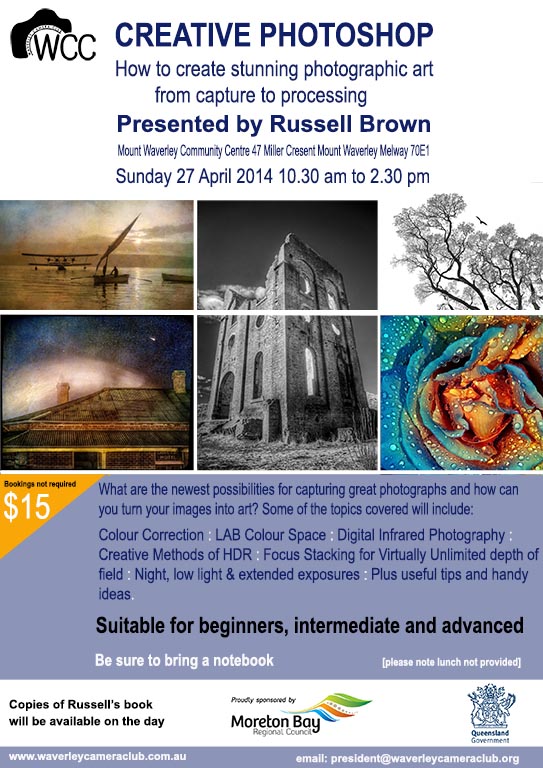
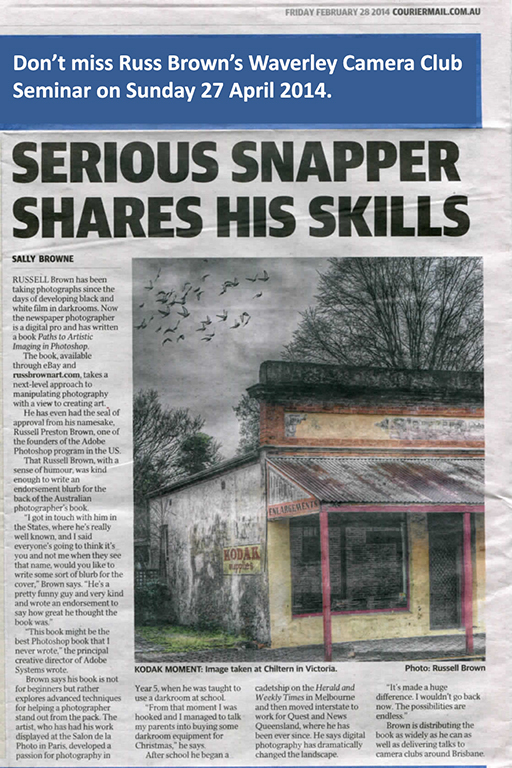
Creative Photoshop Seminar

Brochure 27 April

Creative Photoshop
How to create stunning photographic art from capture to processing
Presented by Russell Brown
Mount Waverley Community Centre, 47 Miller Cresent, Mount Waverley, Melway 70E1
Sunday 27 April 2014 10:30am to 2:30pm
Bookings not required, $15
Suitable for beginners, intermediate and advanced

Give Program (P) a Try!

Give Program (P) a try!  

John Hadfield, Waverley Camera Club Member, talks to Anne Ramus

It’s common for some photographers, particularly beginners, to ask what mode they “should” be shooting in.  Perhaps there’s some mystique about using Manual in that pros allegedly use it?

Many pros use Manual because it suits the consistency of a fixed lighting environment – the set-up time is not an issue. But in a shooting situation where lighting or focus points may be constantly changing, being in Manual mode means too much time is taken setting up the shot – and a fleeting photo opportunity may simply whizz past while you’re busy wrangling settings!

Look at it this way: Manual requires you to set both Aperture and Shutter Speed, but you’re using the camera’s light meter to guide you.  So if you use Aperture Priority, you’re making a selection essentially around Depth of Field – it’s easy if the whole shoot session involves this element.

If you select Shutter Priority you’re making a selection based on freezing the action or recording a blurred (intentional) image, such as with active children or pets, or sports action.  With either Aperture or Shutter Priority modes, the camera sets the correct exposure control to balance your particular selection using its light meter.  Otherwise, you could lose a lot of shots simply because by the time you’ve set up your camera, the moment has passed.

Now let’s look at one pro who presented at a couple of our WCC workshops on photo journalism – and he shoots for Getty Images.  He uses Program (P).  Program is a good balance if you don’t have a need to bias aperture or shutter speed to capture a certain image.

I use P all the time for general shots.  P is like Auto but it doesn’t fire the flash for almost every shot.  P doesn’t change the ISO.  P is good because it has a progression of aperture and shutter speeds depending on the amount of light and the focal length of the lens.  As you use a longer focal length, it quickens the shutter speed to minimise blur from camera shake.

Give Program (P) a try.  Only go to a priority (A or S) for a particular type of image control, i.e. depth of field or shutter speed for stopping action or causing blur.  Unless you have a particular image style in mind, I would set your camera up for a day’s general shooting  (and the level of light) to give you a reading of about F/5.6 – F/8, a Shutter Speed of not less than 1/125 and an ISO to give you those readings (probably about ISO 200-400).

Set the Mode to Program (P), only changing to Aperture or Shutter to suit a particular type of shot.  I would guess that 80% of your shots will fall within that range I mentioned above.  I would increase the ISO as necessary to keep within my suggested aperture/shutter speed range for general daytime photography.  Be aware that the lower the ISO, the less image ‘noise’.  Further, cameras vary in their ability to handle noise – another factor which will influence your choice of ISO setting.

Overall, it’s important to realise that the “Exposure Triangle” of Aperture, Shutter Speed and ISO always involves compromises; it’s a juggling act of your own creative decisions plus the technical path you choose to achieve the image you want.


Anne Ramus

Lightroom export settings for club competitions

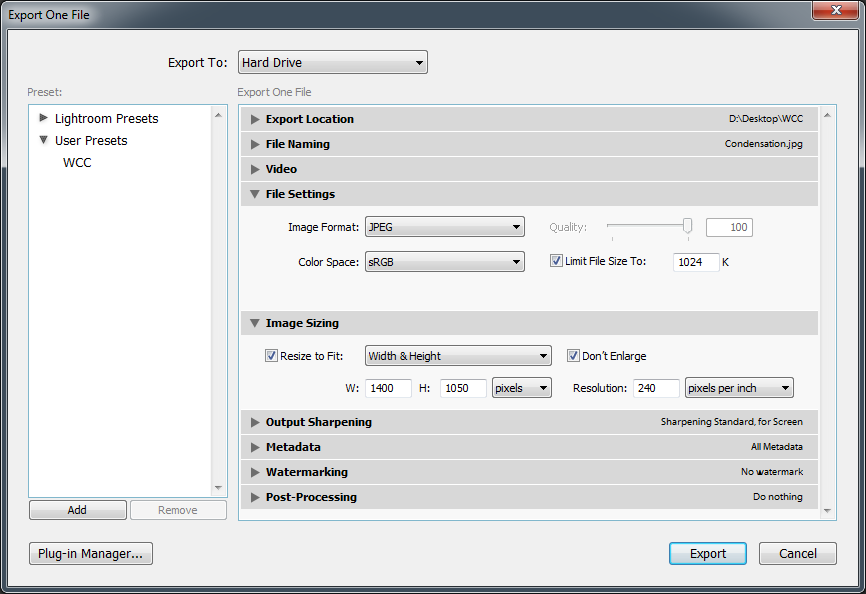
For members that use (or are thinking about using) Lightroom, here is an example of the settings to use when exporting images for our monthly competitions:

lightrom-export-preset

The file settings section is where you set it to JPEG, ensure the colour space of the exported file is sRGB (doesn’t matter what your source image is, the export will be sRGB) and enable a file size limit (JPEG quality is automatically adjusted to achieve this which is why quality is greyed out).

In the image sizing section is where you size the image. These settings will produce an exported image that fits within our maximum width of 1400 pixels and maximum height of 1050 pixels while maintaining the aspect ratio.

If you had to severely crop your image (eg you didn’t have a long enough zoom) then the don’t enlarge setting will not stretch out a small image to the 1400×1050 size that could result in a blurry or blocky image..

Ignore the resolution option. This is only a suggestion for printing, it has no impact on how many pixels are in the image. In general, unless you are scanning from or printing to a physical surface, don’t worry about ppi or dpi.

Once you have your export settings entered, you can save them as a user preset so that next time you just select the preset instead of going into the export dialog.